
Start with your original photo.
Use the highest-resolution version you have, ideally from your camera or phone. Screenshots and images saved from messaging apps are often much smaller. Upload a still JPEG, PNG or WebP up to 20 MB and 40 megapixels. HEIC and animated files are not supported in this release; export as JPEG first.
Give the details some room.
Choose portrait or landscape, then drag and zoom to find the right crop. Keep faces, lettering and important details within the dashed safe area. That guide is illustrative; final wrap depth and bleed must be confirmed with the production supplier.
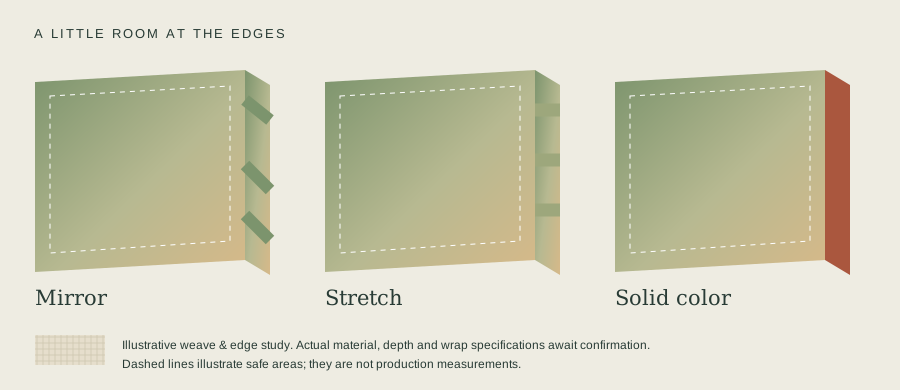
How much resolution is enough?
We calculate effective pixels per inch after cropping. 150 PPI or more is a useful starting point; 100–149 PPI may look soft up close, and below 100 PPI receives a warning. A bigger canvas needs more pixels. The warning is guidance, not a guarantee of print quality.
| Size | Pixels at 150 PPI |
|---|---|
| 8 × 12″ | 1200 × 1800 |
| 12 × 18″ | 1800 × 2700 |
| 16 × 24″ | 2400 × 3600 |
| 20 × 30″ | 3000 × 4500 |
| 24 × 36″ | 3600 × 5400 |
Want the why behind these numbers? Read our plain-language guide to photo resolution for canvas prints: PPI, phone photos and how to fix a low-resolution image.
You approve the final crop.
The exact front-face proof is created from your original upload on our server. Your edits never replace the original. We do not apply AI enhancement, background removal, text or collages to canvas orders. Those features remain unavailable until supported production integrations exist.
Open the photo studio ↗